
Skip to content

Features

From booking to return visit, in one dashboard

Online booking, capacity control, LINE notifications, customer records, checkout, and reports are all included for US$15 per member per month. No tiers, no add-ons.

Start free trial
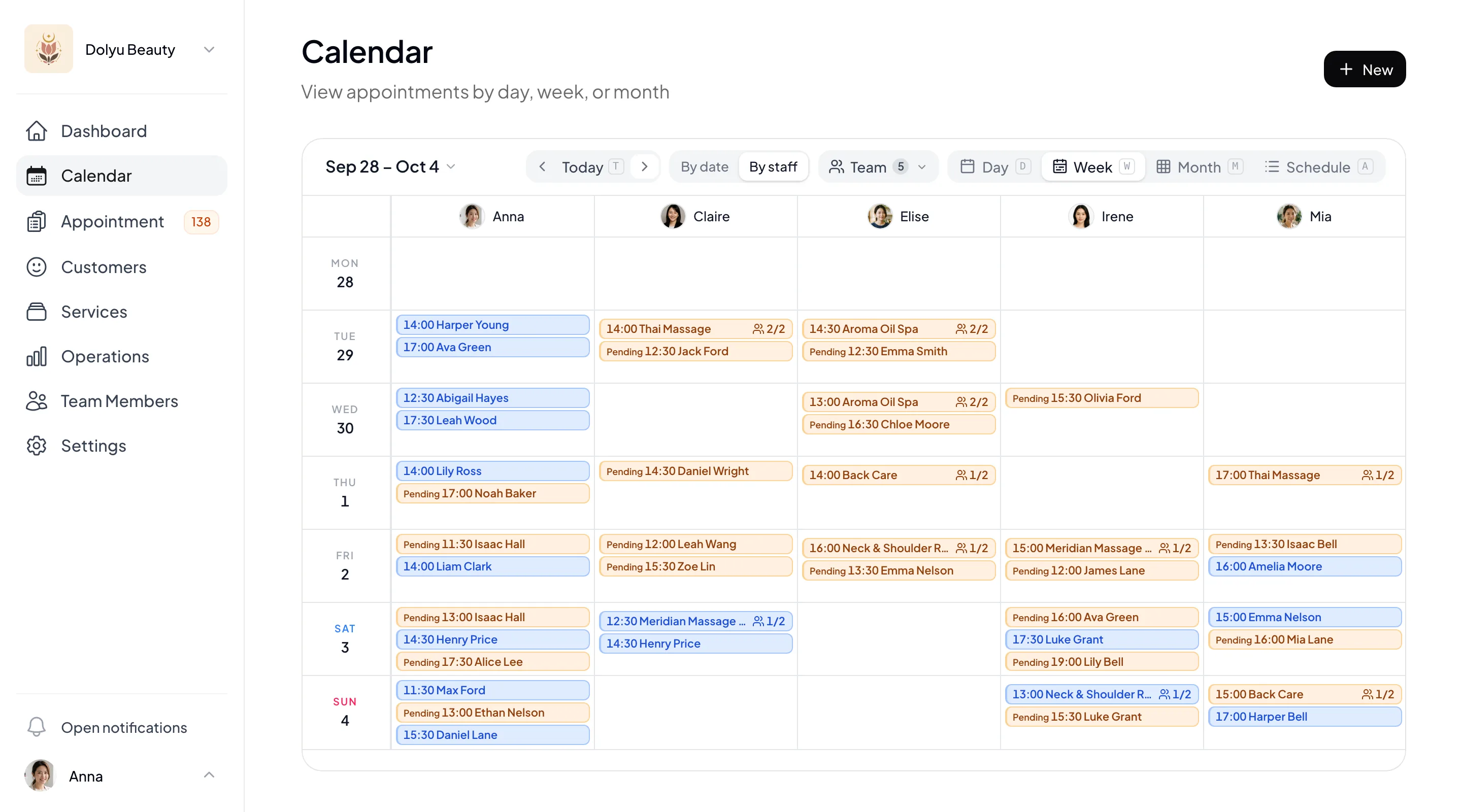
Dolyu dashboard calendar showing a week of appointments by staff member
Dolyu branded booking page on mobile

01 Features at a glance

From booking to back office, in one dashboard

Each tile shows one feature as it appears in the dashboard. LINE and group classes have their own detailed pages.

Online booking

Your branded booking page, open for bookings 24/7

Customers book on their own through your branded URL (yourbrand.dolyu.app). They choose a service and a time, then pick a staff member or let Dolyu assign one. There’s no app to download. The booking page is available in Traditional Chinese, English, and Japanese, and customers can switch time zones to view time slots.

  • Your branded URL, plus a booking link you can copy for any single service
  • Auto-assign an available staff member when none is selected
  • Multiple services in one booking, scheduled back to back
  • Prep time before and buffer time after each service
  • Business hours can span midnight
  • Multi-slot bookings, 2–20 slots at a time
  • Customers reschedule or cancel on their own, with a deadline you set
  • Individual schedules for each team member, with conflicting slots excluded automatically
Learn about scheduling and staff selection

Classes & venues

Multiple bookings per slot, with capacity managed by Dolyu

Group classes, small classes, seating, and private bookings all use the same setup. Decide whether the limit comes from staff or a venue, and whether capacity is counted per person or per booking. Dolyu adds up bookings automatically and closes slots when they’re full.

  • “Bookings each staff member takes at once”: N people or N bookings
  • Multiple services share one venue or piece of equipment
  • Per booking with a capacity of 1 for private bookings
  • Customers choose a headcount, and the total price is calculated automatically
Learn about class and group booking

LINE integration

One-click rich menu deployment and automatic notifications

Choose a template in the Dolyu dashboard and deploy your rich menu to your LINE Official Account in one click. Notifications for confirmations, reminders, reschedules, cancellations, and more go out automatically based on your settings.

  • Multiple rich menu templates
  • Generate and deploy in one click
  • A range of automatic LINE notifications
  • LINE message quota monitoring
Learn more about LINE integration

Customer management

Every customer’s history on one page

Each customer’s service history, preference notes, and purchases sit on one page. Use tag-based segments and points to build long-term relationships.

  • Tag-based segments and quick filters
  • Purchase history and preference notes
  • Points, including mixed payment
  • CSV import and export
Learn about customer records and points

Booking forms

What you need to know, collected at booking

Turn the questions you ask before an appointment into a form. Customers fill it in at the last step of booking. Follow-up questions appear based on earlier answers, and returning customers see their last answers filled in. Answers stay with the appointment, so you can view them in appointment details, exports, and new appointment notifications.

  • Start from an industry template
  • Short answer, choice, date, number, and other question types
  • Show questions based on answers
  • Previous answers filled in for returning customers
  • Preview at phone size before saving
Learn about booking forms
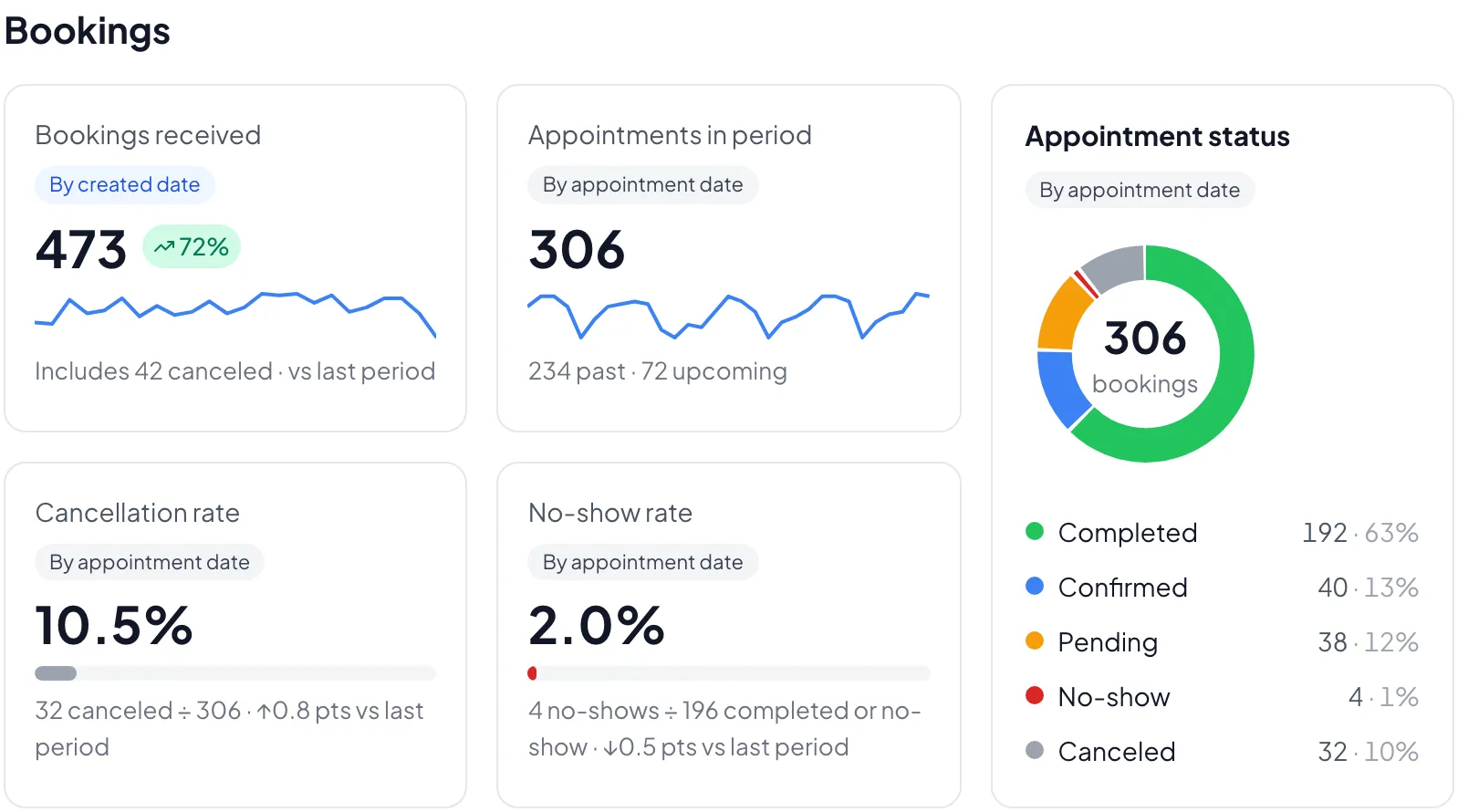
Dolyu booking overview: bookings received, cancellation rate, no-show rate, and booking statuses

Business reports

From bookings to revenue, every report on one page

Booking overview, booking times, booking channels, customer value, service profitability, staff performance, and the revenue report sit together on the Operations page, and the financial overview shows revenue, cost, and gross profit at a glance. Pick a period to compare it with the previous period or the same period last year.

  • Booking overview and booking times
  • Booking channel analysis
  • Customer value: visits and revenue
  • Service profitability and staff performance
  • Revenue report: profit and loss plus every entry
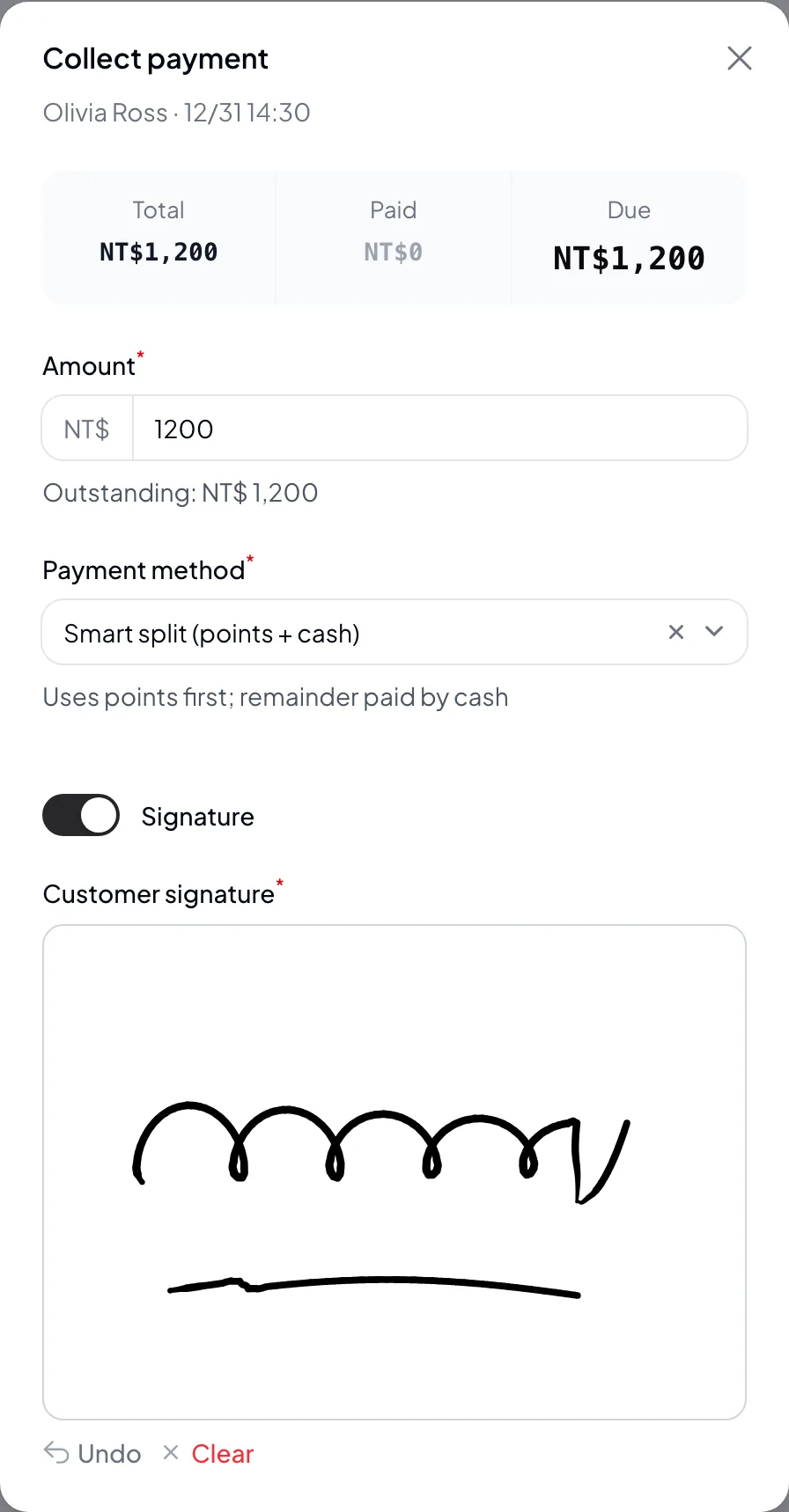
Dolyu payment dialog: points and cash split, confirmed with the customer’s signature

Checkout & operations

Checkout, permissions, and tracking in one dashboard

Check out in the dashboard after each service, with cash, points, mixed, and partial payments. Team permissions, blocked customers, other income and expenses, and ad tracking are managed in the same place. Everything is included in one plan.

  • Checkout: cash, points, mixed, and partial payments, plus refunds
  • E-signatures at checkout
  • Owner, Admin, and Member roles
  • Blocked customers and no-show history
  • Other income and expense records
  • GA4, GTM, and Meta Pixel booking event tracking
  • Add to Google Calendar and ICS calendar files
  • Install the dashboard on your phone, with push notifications for new bookings
Learn about reminders and no-shows

02 Try it free

Choose your industry and explore every feature

No sign-up required. Jump straight into the dashboard or booking page and experience Dolyu firsthand.

Get started

Start your free trial of Dolyu’s booking system

Customers book on their own and notifications go out based on your settings, so you can get back to your work.

Start free trial
  • US$15 per member per month, no per-feature fees
  • 14-day free trial, no credit card required
  • Billed monthly, no contract