Customer management
Every customer's record on a single page
Profiles are created automatically when customers book. Visits, spend, points, and no-shows sit on one page. Notes can include photos, ready to check before the next service, even when a different staff member serves the customer.
- Created as soon as a customer books
- Automatic profiles
- Add photos to notes and service records
- Photo records
- Switch between new, birthday, and lapsed customers in one click
- Segments
- Add, deduct, and pay with points in one place
- Points
01 Customer profiles
Created automatically at booking, or imported from your existing list
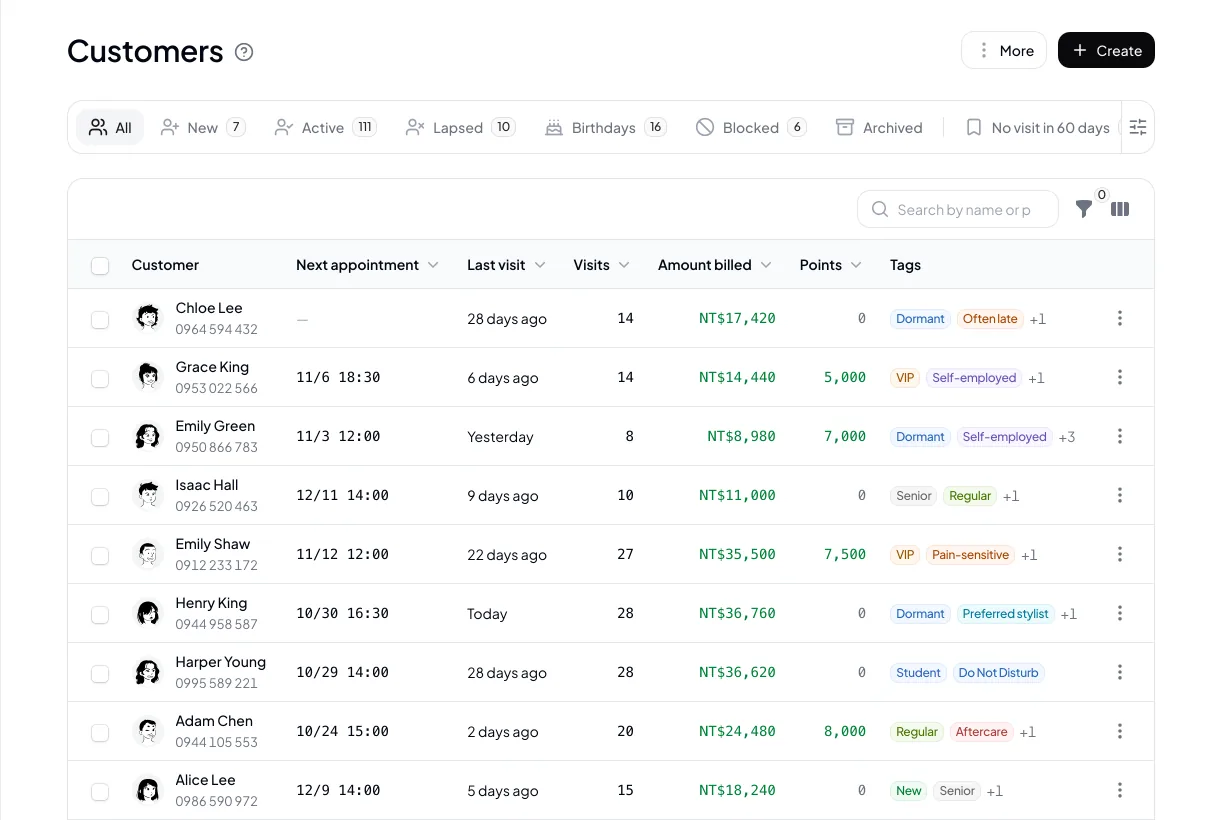
A customer profile is created automatically on their first booking. You can also add one manually in the dashboard or import an existing list by CSV. If a customer in your list already has the same phone number, importing updates the existing profile.
- Created automatically at booking
- CSV import, matched by phone number
- Name, phone, email, birthday, gender
- List filtering and CSV export
02 Notes & tags
Keep preferences and formulas in notes
Each customer has a note field that can include images, and each appointment can have its own service record with photos. Set your own tag names and colors to sort customers into regulars, VIPs, or any category you need.
- Customer notes can include images
- Service record for each appointment
- Custom tag names and colors
- Add or remove tags in bulk


03 Overview & points
Next appointment, visits, and points at a glance
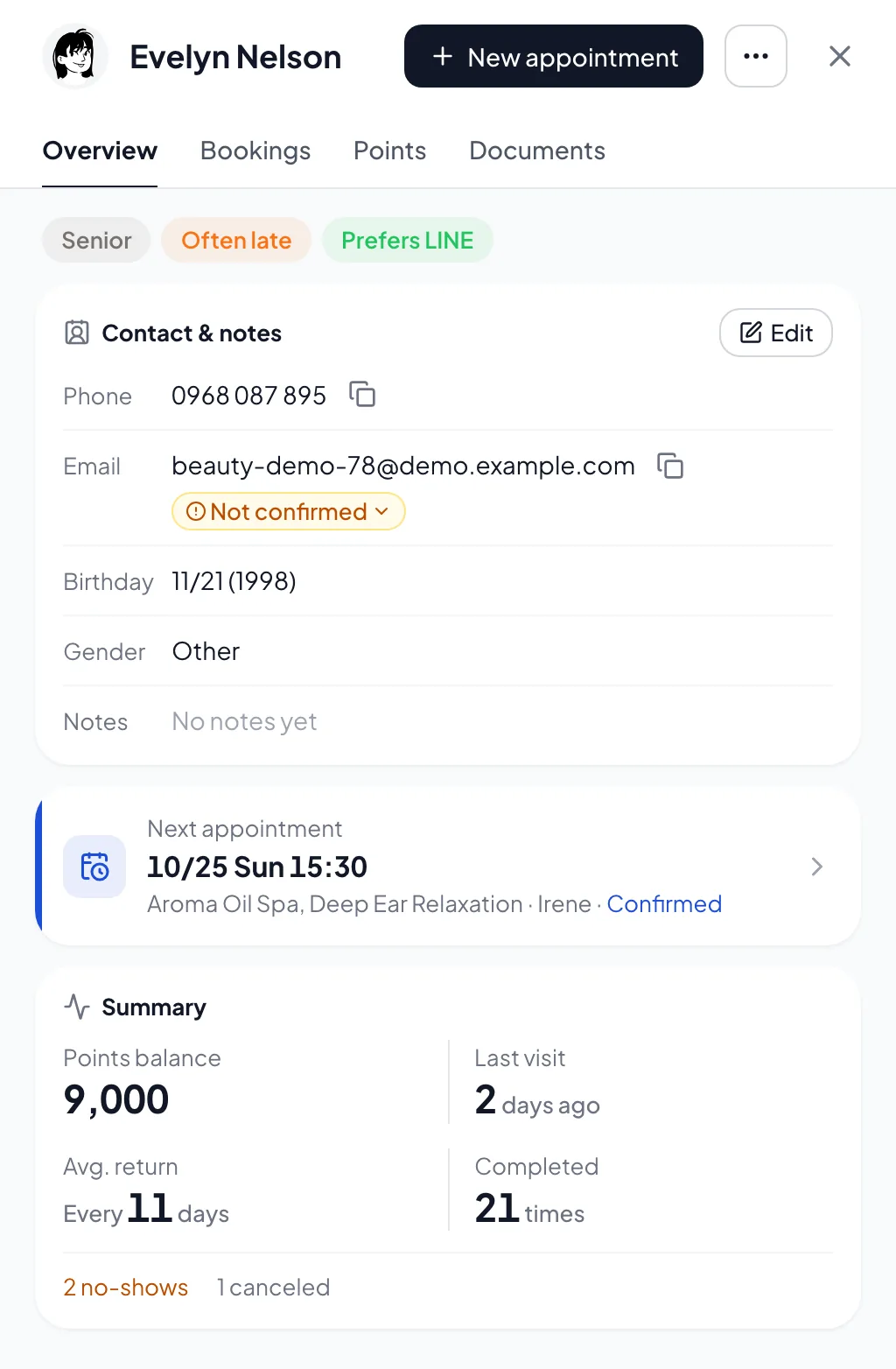
The customer overview shows the next appointment, points balance, last visit, average days between visits, and completed visits, along with no-show and cancellation counts. You add or deduct points, and every change is logged. Customers can pay with points at checkout.
- Next appointment
- Last visit and average return interval
- Points balance and transaction history
- No-show and cancellation counts
04 At a glance
Key features,
all in one place
Ready from day one. Everything’s included in the plan, with no add-ons.
- Profiles
- Created automatically when customers book, or added by hand.
- Import & export
- Import existing lists by CSV and export your customer list.
- List tabs
- Switch between new, active, birthday, lapsed, and other lists in one click.
- Tags
- Custom names and colors, added or removed in bulk.
- Notes & service records
- Add photos to notes and to each appointment's service record.
- Points
- Add, deduct, and use points at checkout, with every change logged.
- Permissions
- Customer data is shown by role.
05 Industries
Industries that commonly use customer records

Hair Salon
Keep color formulas and shade numbers in the service record and mix the same color next time.

Nail Salon
Last visit's design photo is in the record, ready when a customer asks for "the same as last time".

Lash
Lash length, curl, and preferences go in the notes, ready to check before the next appointment.

Skincare & Facial
Services and products used at each visit go in the service record, ready before the next visit.

Massage
Pressure preferences and focus areas go in the notes, ready to check before each session.

Tarot Reading
Keep the last question and spread in the service record and pick up from there next time.
06 FAQ
Customer records
FAQ
Yes, by CSV. Name and phone are required, with email, gender, birthday, and notes optional. Excel or Google Sheets can both save as CSV. You can also send us the file and we'll help clean it up and import it for free.
The Owner and Admins can view and edit customer data. Members can view only the basic info and notes of customers they've served, and can't edit them.
You add or deduct points for each customer, and 1 point equals 1 unit of your currency. Every change is logged. Customers can check their points balance on the booking page and pay with points at checkout.
Tags are for categorizing only and don't affect booking. Blocking a customer stops their online bookings but doesn't affect signing in or viewing their history.
Yes. Archiving removes the customer from the list, and you can unarchive them when needed. They also return to the list automatically the next time they sign in.
Customer notes and tags appear only in the dashboard. Service records are private by default, and you can share individual records with the customer when needed. On the booking page, customers see their own appointments and points balance.
Yes. Export the customer list as CSV and open it in Excel or Google Sheets.
Resources
Explore more
- Online consent forms Signed online at booking, with version and signature records
- Booking forms Customers fill in the details you need when they book
- Appointment reminders & no-show management Two reminders, cancellation deadlines, and automatic blocking for no-shows
- Scheduling & staff selection Weekly hours, time off, shift changes, and automatic staff assignment
- LINE integration One-click rich menu deployment and a range of automated notifications
- Pricing & plans US$15 per member per month, all features, billed monthly, no contract
Get started
Start your free trial of Dolyu's customer records
Customers book on their own and notifications go out based on your settings, so you can get back to your work.
- US$15 per member per month, no per-feature fees
- 14-day free trial, no credit card required
- Billed monthly, no contract